

Providing Documentation

Introduction
Insurers may request supporting documentation to verify the details of your policy. The guide below outlines the most frequently requested items and explains how to submit them correctly. Please be aware that failing to provide the necessary documents within your insurer’s specified timeframe could lead to policy cancellation, changes to your cover or the application of an additional premium.
Our team may have informed you what documents you need to send at point of purchase. If it’s slipped your mind, don’t worry, we’ll send you a handy reminder of the documents we require approximately seven days from your policy start date.
Documents are usually necessary at new business or when your policy is transferred to a different insurer. However, during the renewal process, there may be situations where we need extra documentation, such as if you’ve changed your address or if your license has expired. In such cases, we will inform you accordingly.
How to send your documents to us

Take a photo or scan
Please scan or photograph the original document clearly, ensuring the entire page or item is visible. Scans or photos of cropped or partial pages cannot be accepted.

Send us your files
The simplest way to submit your documents is by uploading them to your MYQMT portal. Alternatively, you can email the files to admin@qmtcommercial.co.uk.

Help us to help you
Please include your reference number to help us locate your policy. Once we’ve processed your documents, we’ll let you know if we have everything we need.
Frequently requested documents
No Claims Bonus (NCB)
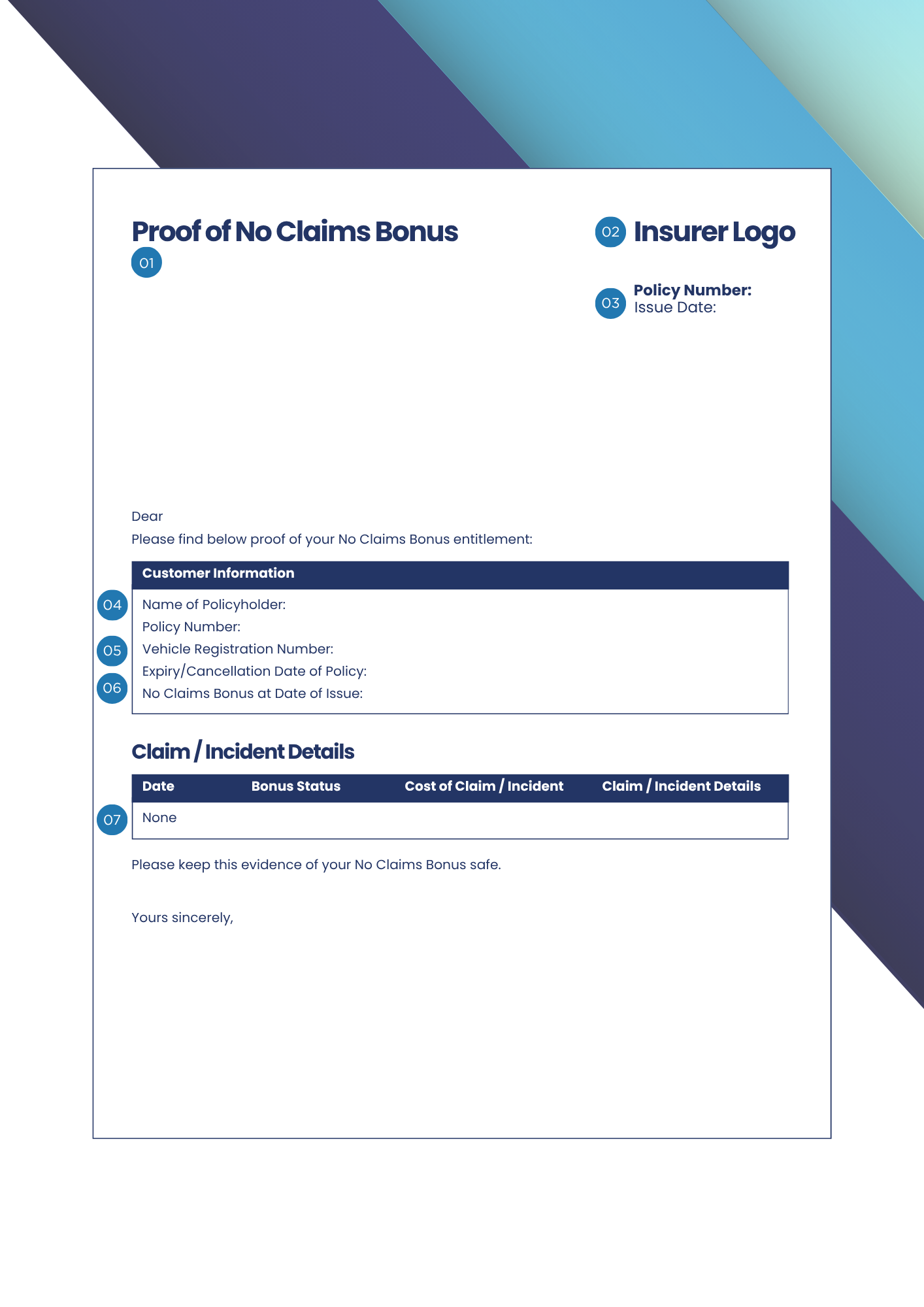
If your policy is No Claims Bonus rated, or you are using No Claims Discount, we will require proof of your No Claims Bonus to meet the below acceptance criteria.
01. Format
A PDF letter or scan of your posted No Claims Bonus letter. Email confirmation, policy documents and screenshots of your No Claims Bonus are not acceptable.
02. Issuer
Must be issued by the insurer, not the broker. Broker‑issued NCB is only acceptable where delegated authority is confirmed, including full claims history.
03. Issue date
Must be dated after your previous policy has expired or been cancelled. Pre-issued letters cannot be accepted as they may not include up to date information.
04. Policyholder name
Must be in the name of the policyholder (for sole traders), an active director listed on Companies House as at inception of the policy, or in the limited company name.
05. Registration
The vehicle registration should match the vehicle on which the no claims bonus is being used. If you are looking to transfer no claims bonus from a sold/scrapped vehicle please see our guide below.
06. Expiry date
Bonuses from live policies aren’t accepted and your NCB must cover the full period between policies. Any gaps must be supported by an up‑to‑date NCB letter or SORN details.
07. Claims
Must confirm no claims or, where claims have been recorded, you will need to provide the date, claim type (e.g. accident, windscreen, theft), fault/non-fault, open/closed, final costs/reserve costs.

Transfer of No Claims Bonus (NCB)
In some instances, your insurer may accept a transfer of No Claims Bonus, for example if you’ve recently sold and replaced your vehicle. In order for this to be referred to the insurer, we typically require some additional documentation as follows:
01. Proof of No Claims Bonus
Earned on the vehicle you wish to transfer the no claims bonus from. This document should meet the above acceptance criteria.
02. Proof of scrap or sale
Proof that the vehicle your no claims bonus has been earned on has been scrapped or sold before your policy start date.
03. Previous policy schedule
A copy of the insurance schedule from the vehicle the no claims bonus has been earned on showing the make and model.
04. Confirmation of details
Written confirmation from the policyholder that the no claims bonus is not in use on any other vehicle or policy (email is acceptable).

Driving licence
On some policies, we’ll need a clear copy of the driving licence. If applicable, we’ll let you know whose licence we need, but depending on insurer this could include:
- All drivers of the vehicles
- The declared/main driver
- Any drivers with motoring convictions within the last 5 years depending on the insurer
- Any young or inexperienced drivers
Please note: If the driving licence has been sent off to be renewed, we will require proof of application in order to request an extension from the insurer.
01. Front of card
The name on the driving licence must match the driver’s name on your policy documents. For example, if the licence displays ‘Christopher’ but the policy shows ‘Chris’, the policy will need to be amended.
The driving licence must be in date and should be the latest copy (past, expired licences cannot be accepted).
For Motor Trade policies, the address shown on the licence should match the policy address.
02. Back of card
We will also need a copy of the back of the driving licence. If you are sending multiple driving licences, please edit the filenames of the backs of photocards to include the driver’s name or initials so we can identify them correctly.
DVLA check code
If a driving licence is required, we’ll also need a DVLA check code. This enables us to access any motoring conviction details, ensuring your policy information is accurate and up to date.
Please note that this record qualifies as personal data. To remain compliant with GDPR, you should ask the driver generate their own DVLA check code.
Generating a DVLA check code online is quick and easy – just follow the steps below. Alternatively, if you’d rather speak to someone directly, you can request the code by calling the DVLA on 0300 083 0013 (call charges may apply).
For Northern Ireland driving licences, please use: https://www.nidirect.gov.uk/services/view-or-share-your-ni-driving-licence-information
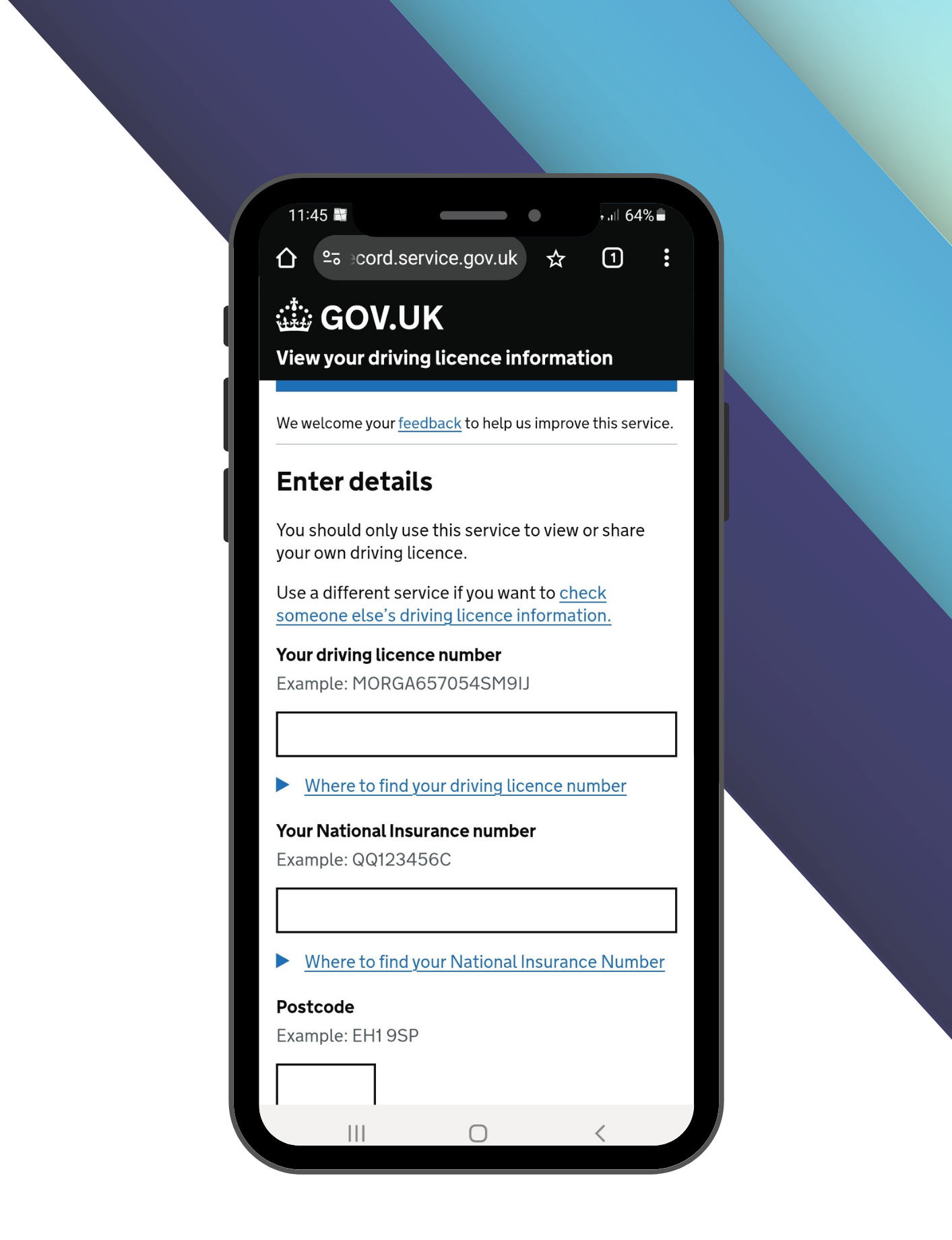
01. Visit the DVLA website
Go to https://www.gov.uk/view-driving-licence and click ‘Start now’.
02. Enter your details
Add your driving licence number, National Insurance Number and postcode, then click ‘View now’.
03. Create your code
Click ‘Share your licence information’, then ‘Create a code’.
04. Share your code
Share your 8-digit, case-sensitive check code with us. To avoid any errors or misreading, we recommend taking a screenshot of the code before sending it. Please ensure you don’t use the code yourself, as it’s valid for a single use only – once activated, it becomes invalid and you’ll need to generate a new one for us.

Proposal form
There may be times when an insurer requires a proposal form to be completed. A proposal form is a document which requires completion and enables the insurer to collect all the required risk information. It includes a declaration regarding the accuracy and truthfulness of the information provided and the potential consequences of misrepresentation.
This document will need to be completed in full by the policyholder or company director and returned to us before the insurer deadline.
Most insurers will accept a scanned copy or clear photo(s) of your completed proposal form.

Operators licence
If your vehicle weighs more than 3.5 tonnes you may require an operator’s licence. Many insurers require proof of either your full, valid operator’s licence or your interim licence within a certain timeframe (quite often 28 days from your policy start date).
01. If your operator’s licence has been granted
If your Operator’s Licence is already in place, there’s nothing you need to send us, as we can get the information Government Vehicle Operator Licensing website.
02. If you’re in the process of applying
If you’re in the process of applying for your operator’s licence, you will need to provide a copy of your interim licence within the specified timeframe. Failure to do so could result in policy cancellation or voidance.
Proof of address
Some policies require proof of address. The acceptance criteria for this can vary but typically includes:
01. Format
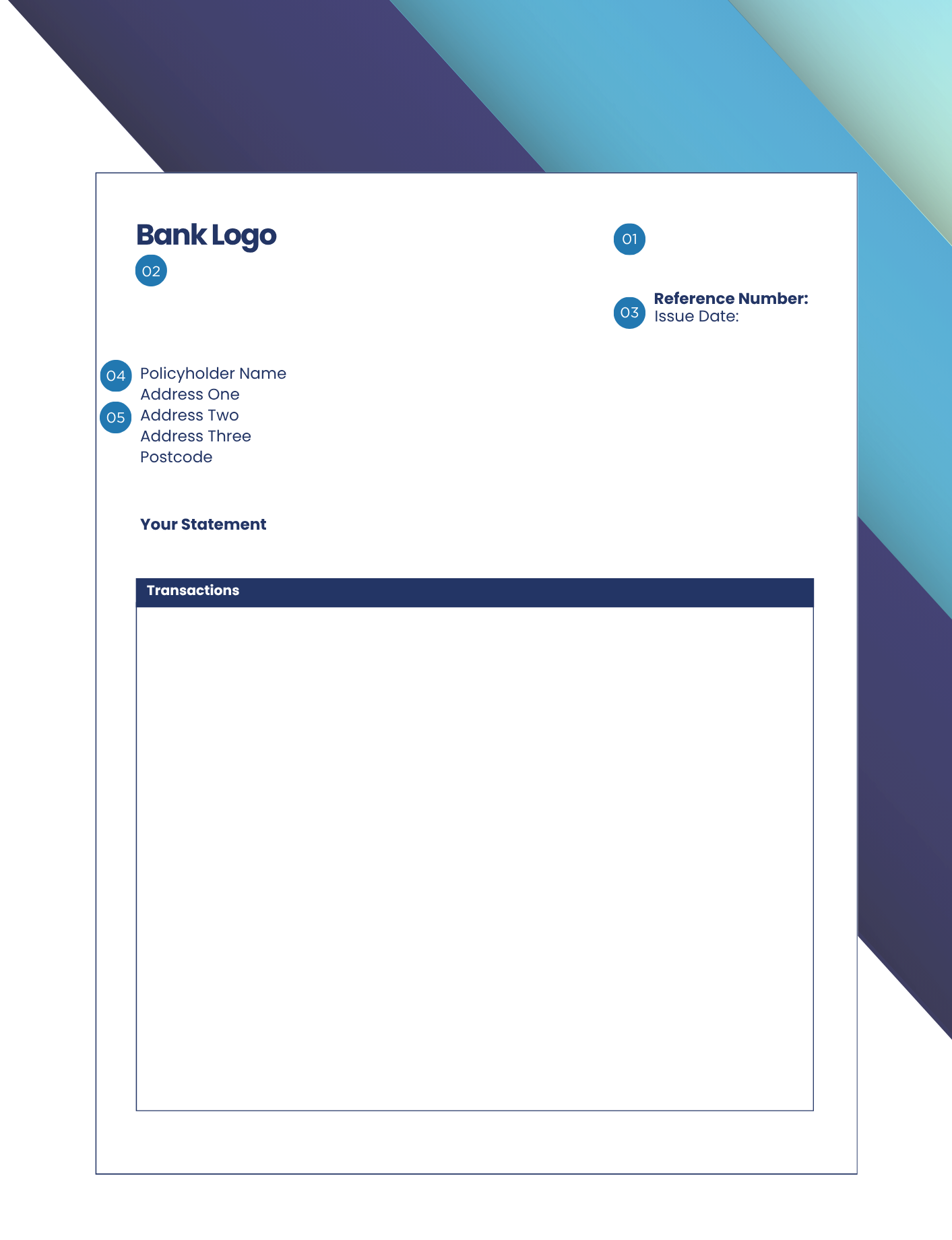
Please send the original PDF, a scanned copy or a clear photo of the entire page. Avoid cropping the image or sending only the header, as we need to see the full page. We understand some information is confidential so you may wish to cover these details with a marker or paper before sending.
02. Issuer
Acceptable documents include a bank statement or utility bill. Some insurers may also accept a tenancy agreement or a council tax bill. However, media bills – such as landline or mobile phone statements – are generally not accepted, nor are communications from HMRC or Companies House.
03. Issue date
The document must have been issued within the specified timeframe (usually within 90 days of your policy start date).
04. Policyholder name
The name on the document must match that on your policy. For sole traders, this would be the policyholder’s name. For limited companies, the document must show the company name.
05. Address
The address on the document must match the address on the policy.

Proof of trading
Certain insurers – particularly for Motor Trade Policies – require proof of trading. They will outline the number of items needed and the timeframe in which they must be dated, often requesting six documents dated within 90 days of your policy start date. For newly established businesses, an extension may be granted to allow additional time for submission.
Typically accepted documents might include:
- Public Liability Insurance Schedule
- Sales invoices or receipts
- Supplier invoices or receipts
- Confirmation and proof of the business trading address: (utility bill)
- HMRC Registration Form
- Business bank account statements
- Lease Agreement(s) for business premises
- Membership of Trade Association (or other official trade body)
- Employers’ Reference Number (ERN)
- Employers’ Liability Insurance certificate

Proof of other cover
Some Motor Trade insurers require proof of separate insurance in the form of a certificate and schedule for the following occupations:
- Any self-employed occupation
- Builder/Labourer
- Electrician
- Plasterer
- Plumber
- Scaffolder
- Gardener
- Maintenance Person
- Company Director
- Shop Keeper
- Taxi Driver
- Window Cleaner
- Any other occupation where the client drives to multiple places of work.

V5 log book
Occasionally, an insurer will require a copy of your V5 log book. Please scan or take a clear photo of each page. If you are providing multiple V5s, please clearly label the files.
If you have converted your Motorhome, the insurer will require proof of the updated V5 or conversion photos if the V5 cannot be changed.
- a door that provides access to the living accommodation
- a bed
- a water storage tank or container on, or in, the vehicle
- a seating and dining area
- a permanently fixed means of storage, a cupboard, locker or wardrobe
- a permanently fixed cooking facility within the vehicle, powered by gas or electricity
- at least one window on the side of the accommodation
ADI / PDI badge
Driving instructors are required to submit a copy of the front and back of their valid ADI / PDI badge as proof of accreditation.
HETAS certificate
While some insurers do not permit log burners in Park Homes, those that do will require a valid HETAS Certificate as proof of safe installation.
Milometer reading
For Motorhome Insurance Policies, a milometer reading is required at the start of the policy and must also be provided at each renewal. Please take a clear photo of the dashboard with the miles/KMs – this must closely match the mileage specified on your policy and mileage information may be used in the event of a claim.
Membership proof
Motorhome Insurance policies may require proof of membership to qualify for discounts. This must be a photo of the membership card, with name, dates and membership number. The date must show the expiry. It must be a paid members club not a free club.
